Livery Codes
Find FR Legends livery codes for custom, drift, racing, and JDM designs. Search by car or livery type, copy the code, and import it into FR Legends.
The livery source returned HTTP 502.
Quick Answer:
FR Legends livery codes let you copy custom car designs made by other players. A body code adds the main design to the car, such as colors, stripes, and decals, while a window code adds the design used on the windows. Some liveries need both codes to look like the original design. If a code does not work, first check that you selected the correct car and copied the complete code.
What Are FR Legends Livery Codes?
FR Legends livery codes let you use custom car designs made by other players. Instead of adding every color, stripe, decal, logo, and graphic yourself, you can use a shared code to recreate the design on your car.
This makes it much easier to use a livery you found online. However, one code does not always contain the complete design. Some liveries use a body livery code for the main car design and a separate window livery code for the windows.
What Is a Body Livery Code?
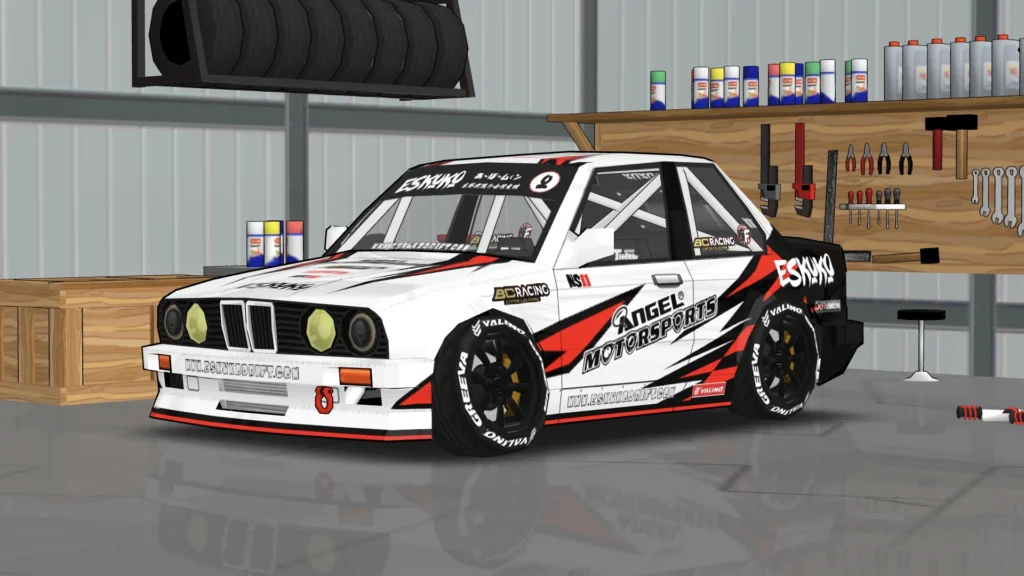
A body livery code is used to add the main design to your car. It can include colors, stripes, decals, logos, and other graphics placed on areas such as the hood, doors, fenders, front bumper, and rear of the car.
For example, a racing livery may have large stripes running across the car from the front to the back. The important thing is to use the code with the same car it was created for, because different fr legends cars have different body shapes and panel layouts. A livery made for one car may not look the same when used on another.
What Is a Window Livery Code?
A window livery code is used for the window part of a car’s design.
A creator may use a separate window design to add graphics, colors, text, or other details to the glass.
This means one complete-looking car may have two different codes:
Body code → main car design
Window code → window design
If you only use the body code, the car may look close to the original but still be missing some of the details shown in the creator’s picture.
Body Code vs. Window Code
Body and window livery codes are used for different parts of the car. A body code adds the main design to the car, including colors, stripes, decals, and other graphics. A window code is used for designs or details placed on the car’s windows.
| Body Livery Code | Window Livery Code |
|---|---|
| Used on the main car body | Used on the windows |
| Adds the main exterior design | Adds window-related details |
| Can include colors, stripes, and decals | Can include window graphics and designs |
| Usually applied first | May need to be applied separately |
When you find a livery online, check whether the creator has shared only a body code or both a body and window code. If both are provided, you may need to use both to get the same look as the original design.
How Do FR Legends Livery Codes Work?
Think of a livery code as a shortcut for a custom design.
Normally, you would have to place colors, graphics, and decals yourself. A shared code can save you from doing all that work again.
The basic idea is:
Livery code → game reads the design → livery appears on the car
The important part is that the code needs to match the right car and the right game environment.
If the code is incomplete, copied incorrectly, or made for a different setup, the result may not match the original design.
How to Use an FR Legends Livery Code
The exact menu can be different between game versions or builds, but the general process is simple.
1. Choose the Correct Car
First, select the same car that was used to create the livery.
If the creator made a livery for a specific car, do not assume the same code will work on another car.
2. Open the Livery or Customization Area
Go to the part of the game where you can change the appearance of your car.
3. Find the Code or Import Option
Look for the option used to enter or import livery information.
The name and location of this option may be different depending on the version you are using.
4. Enter the Code
Copy the complete code and enter it into the game.
If copying and pasting is possible, use that instead of typing a long code by hand.
5. Apply the Livery
Let the game process the code and apply the design.
6. Check the Whole Car
Do not only look at one side.
Turn the car around and check the front, rear, sides, hood, and other panels.
7. Add the Window Code
If the creator also provided a window code, apply that separately if required.
8. Save Your Design
Once everything looks correct, save the finished livery.
How to Find Good FR Legends Livery Codes
You can find many custom FR Legends liveries shared by players online.
But not every code you find will work.
Before using a code, check these things.
Check the Car
Make sure the code was made for the same car you are using.
A code can be perfectly fine but still fail to give the expected result if it belongs to another car.
Check the Full Code
Long codes can be easy to copy incorrectly.
A missing character can stop the code from working correctly.
Check the Preview
Look at the picture posted by the creator.
After applying the code, compare your car with the original picture.
This can help you see whether the problem is with the code or with another part of the livery.
Check for a Window Code
Some creators share a body code and window code separately.
If you only have one code, check whether another code was posted with the original design.
Check the Source
Older posts may not have all the information needed to recreate a design.
If possible, keep the original post, screenshot, or information that came with the livery.
FR Legends Livery Codes for Popular Cars
Players often search for FR Legends Supra Mod livery codes, AE86 liveries, Silvia designs, Skyline liveries, and RX-7 liveries.
The same basic rule applies to all of them: check the exact car before using the code.
1. Supra Livery Codes
When looking for an FR Legends Supra livery, check the car shown in the original post.
Look at the preview before using the code. If the creator gives you both body and window codes, keep them together so you do not lose one part of the design.
2. AE86 Livery Codes
AE86 liveries can range from simple street designs to detailed racing and drift liveries.
Before using a code, check that the car in the original image matches the car you have selected.
3. Silvia Livery Codes
Silvia liveries can use simple colors and decals or much more detailed designs.
If a creator gives separate body and window codes, make sure you label them correctly before entering them.
4. Skyline Livery Codes
For Skyline designs, check the exact car shown by the creator.
Do not assume that a code for one Skyline-style car will produce the same result on another vehicle.
5. RX-7 Livery Codes
When using an RX-7 livery code, check the car, preview, and complete code before applying it.
If the design includes a separate window code, save that information too.
Why Is My FR Legends Livery Code Not Working?
Sometimes a FR Legends livery code does not work as expected. The problem may be something simple, such as a missing character, the wrong car, or using a body code where a window code is needed. Before looking for another livery, check these common problems.
Incomplete Code
If even a small part of the code is missing, the livery may not load correctly.
What to do: Copy the complete code again from the original source. If it is shown in a screenshot, make sure you have copied every part.
You Selected the Wrong Car
Livery codes are made for specific cars. A code created for one car may not give the same result on another.
What to do: Check the original livery post and make sure you have selected the same car shown by the creator.
The Code Was Entered Incorrectly
Long codes are easy to mistype, especially when entering them by hand.
What to do: Copy and paste the code whenever possible. If you typed it manually, check it carefully against the original.
You Mixed Up the Body and Window Codes
Some liveries have two separate codes. One is for the car body and the other is for the windows.
What to do: Check how the creator labeled each code and use the body code and window code in their correct places.
The Livery Is From an Older Version
An older livery may not work the same way in a newer game version or different build.
What to do: Check when the livery was shared and whether the creator mentioned a specific game version or build.
Original Post Does Not Have All the Information
Sometimes a player shares a picture of a livery but leaves out part of the code or the window code.
What to do: Search for the same design using the car name, creator name, or livery name. You may find another post with the missing information.
You Are Using a Modded Version
If you are using FR Legends Mod APK, the livery may behave differently from the official version. Different modified builds can have different changes or compatibility.
What to do: Check which version or build you are using and compare it with the version mentioned by the livery creator. This can help you find out whether the problem is with the code or the game version.
How to Create Your Own FR Legends Livery?
You do not have to use someone else’s design.
The FR Legends livery editor can also be used to create your own look.
1. Start With Your Car
Choose the car you want to customize. Before adding graphics, think about the style you want. Do you want a clean street car, racing design, drift livery, or something completely original?
2. Choose Your Main Colors
Start with your main color. Then choose one or two extra colors that work well with it. You do not need many colors to make a good livery.
3. Add the Main Graphics
Once your colors are ready, add the larger graphics and decals. Try to keep them lined up with the shape of the car.
4. Add Smaller Details
After the main design looks right, add smaller logos, numbers, stripes, or other details. Adding too many graphics can make the car look messy, so check the design as you go.
5. Work on the Windows
If you want custom window graphics, make them match the rest of the car. A window design that uses the same colors or theme can make the whole livery look more complete.
6. Check Every Side
Rotate the car and look at it from different angles. A graphic may look good from one side but be poorly aligned on another panel.
7. Save and Test
Save your design and check it again before sharing it. If you plan to share the livery code, make sure the saved version works correctly first.
Simple Tips for Better FR Legends Liveries
FR Legends Livery Codes vs Manual Customization
Both methods are useful, depending on what you want.
| Method | Best For | Main Advantage |
|---|---|---|
| Livery code | Using an existing design | Saves time |
| Manual customization | Creating your own design | More control |
| Community design | Finding new ideas | Gives you a starting point |
Use a livery code when you already found a design you like. Use manual customization when you want to create something that is your own.
You can also use an existing livery as inspiration and then change the colors, decals, or other details.
Frequently Asked Questions
Conclusion
FR Legends livery codes make it much easier to add custom designs to your cars without creating every decal and graphic yourself. The main thing to remember is that body and window codes can be separate, so always check what the creator has shared before importing a design.
If a livery does not look right, check the car, copy the full code again, and make sure you are using the correct body or window code. Older codes can also behave differently after game updates.
Once you understand how the codes work, you can do more than just use other players’ designs. You can edit imported liveries, create your own style, and share your finished designs with other FR Legends players.